


Easy translation with Office products × generative AIMTrans for Office

- Localization: HOME
- Machine Translation
- MTrans for Office
MTrans for Office
promotes the efficiency of translation and writing tasks
within Office products through the combination of generative AI and humans.
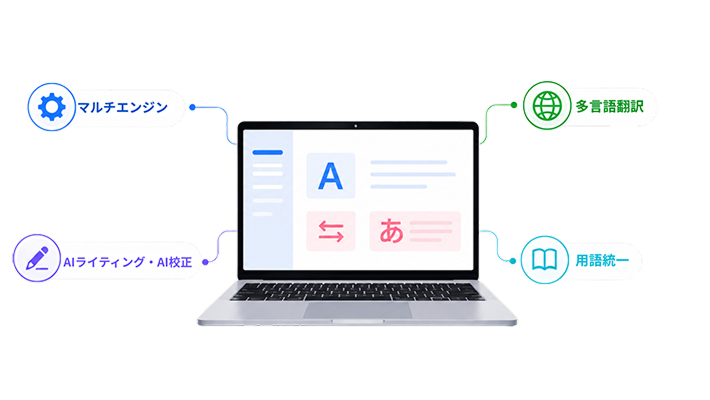
With the power of generative AI, translation and document creation in Word, Excel, PowerPoint, and Outlook can be completed seamlessly.
Eliminate the hassle of copy-pasting and layout disruptions, enabling easy one-click translation from your usual screen.
By leveraging generative AI, it achieves operational efficiency beyond that of ordinary translation software.
Do you have these
concerns with translation tasks?
-
Design, Manufacturing, and Development Departments

- Many specifications and manuals, with frequent updates
- Time-consuming terminology unification and guideline checks, prone to individual dependency
- Increased translation costs due to multilingual expansion
-
Sales and Marketing Department

- Various English outputs are required, such as emails and proposals for overseas markets
- Time is first taken up by the task of converting to English
- The repeated cycle of machine translation and manual corrections increases workload
-
IT and Administrative Department

- Support for global employees
- Security concerns due to expanded use of free tools
- English Translation of IR Materials
-

Security Enhancement
-

Improved Work Efficiency
-

Improved Quality
Solved with MTrans for Office
Human Science's MTrans for Office is
the Reason It Is Chosen
Introducing the 5 strengths of MTrans for Office, which has been adopted and highly rated by many companies.
1. Office Add-in

You can streamline document tasks such as "translation," "document creation," "proofreading," and "multilingual support" that you have been handling in the familiar Office environment.
2. Glossary

By registering "industry terms," "technical terms," and "product names" in the glossary, you can reduce the effort required for corrections.
3. Security

Since the translation engine is connected via API, there is no worry about the disclosure or sharing of translation data.
It also supports security options such as SSO (Single Sign-On) and IP address restrictions.
4. Layout Preservation

The layout and font size of Japanese text remain unchanged, reducing the burden of editing work.
5. Utilization of AI

Post-translation text refinement and tone adjustment are easy to perform. You can improve translation results and receive feedback by interacting with generative AI.
List of Features &
Supported Applications
List of Features
MTrans for Office is equipped with a wide range of features that dramatically improve the efficiency of daily document tasks. In addition to freely switching between multiple engines such as OpenAI and DeepL, you can use practical functions like PDF translation, glossaries, and layout retention within a robust security environment.
Translation & AI Support
 Multi-Engine Equipped
 Chat Support
(AI Assistant) PDF Translation Function
 Browser Version
(MTrans Web)
Quality & Editing Support
 Glossary
 Layout Preservation
 Post-Edit
Auto Replacement Function AI Proofreading Function
Management and Operation
 Prompt Saving
 Supports Windows/Mac/Web Versions
 SSO Support
 Security Measures
Supported Applications
 Outlook
 Word
Word Excel
Excel PowerPoint
* We also support file formats that can be edited in Word, Excel, PowerPoint, and Outlook.
Price List
Detailed Price List (In addition, an initial fee of 100,000 yen is required)
* You can scroll horizontally.
| Starter 3 | Starter 5 | Small | Medium | Large | Extra Large | |
| Account Usage Fee | For trial use | For small and medium-sized businesses/departments | ||||
| Monthly Price | ¥9,000 | ¥12,000 | ¥25,500 | ¥41,100 | ¥94,000 | ¥198,000 |
| Maximum number of users | 3 | 5 | 15 | 30 | 100 | 300* |
- * Please contact us separately if you have more than 300 users.
- * The above price is excluding tax.
- * There is no limit on the number of characters used, but in very rare cases, if a very large number of characters are used,
additional charges may apply.
If the number of characters used falls within the normal range, there is no need to worry about additional fees. - * This is a translation function plan.
- * It can also be combined with the writing function plan. Please contact us for details.
Operating Environment
-
- Microsoft Office 365 Windows Desktop/Mac Desktop/Web version
- Microsoft Office 2016/2019 Windows Desktop Version
- Microsoft Windows, macOS, and web browsers that support the above Office
* Internet connection is required.
- XP (Cross-Platform) Version MTrans for Office – Limitations in Outlook
-POP email accounts cannot use Office add-ins.
-To use Office add-ins with an IMAP email account, you need to sync your email account with Microsoft Cloud (sync settings are only available for the new UI version). For more details, please refer to the Microsoft support page.
Comparison with other products
* You can scroll horizontally.
| MTrans for Office | Translation tool which is provided by the Office software |
Company A | Company B | |
|---|---|---|---|---|
| Translate with one click | Good | △ | Unsupported | Unsupported |
| Translation of only a part of the file |
Good |
Good | Not good (Copy and paste required) |
Not good (Copy and paste required) |
| Translation Engine | DeepL, Google, Microsoft, OpenAI | Microsoft | Company A Translation Engine |
Company B Original Translation Engine |
| Outlook Translation | Good | Unsupported | Unsupported | Unsupported |
| Layout Preservation | Good | Unsupported | △ | △ |
| Pricing | Good First year: 208,000 yen~ |
Excellent Free |
Not good First year: 340,000 yen to (+ additional charges based on usage) |
Not good First year: 960,000 yen~ |
* Comparison made by us
Implementation Results
MTrans for Office Implementation Process
-

01
Contact Us
Please feel free to contact us via the website inquiry form, email, or phone. -

02
Trial
We offer a 14-day free trial. Online demos are also available. -

03
Estimate
We will prepare an estimate based on the number of users. -

04
Contract
You will submit the application form after agreeing to the MTrans Terms of Use. -

05
Service Start
Accounts will be prepared from the contract start date.
FAQ
- QWhat is the difference between the automatic translation feature that comes standard with Office?
- A
Translation engines are different. The automatic translation function included in Microsoft Office products uses Microsoft's translation engine only.
Human Science's MTrans for Office allows selection from DeepL, Google, Microsoft, OpenAI, and more.
It is also possible to connect a custom-trained engine (customization fees apply).
Additionally, the translation engines up to Office 2016 use an older method of automatic translation called "Statistical Machine Translation (SMT)."
With MTrans for Office, regardless of the Office version, you can use highly accurate "Neural Machine Translation (NMT)" powered by AI.
- QWhat is the difference between "Statistical Machine Translation (SMT)" and "Neural Machine Translation (NMT)?"
- A
SMT is an automatic translation using statistics. Translation is achieved by processing a large number of pairs of original text and translated text through statistics.
NMT, also known as "AI translation," is a cutting-edge automatic translation technology that is currently attracting attention.
By using a neural network that mimics brain cells, the quality is significantly improved compared to SMT.
- QDoes the translation quality improve with continued use?
Is it possible to have the system learn from past translation results (memory)? - A
Although the engine does not have a learning function, the translation quality can be improved by using the glossary function.
- QWhat languages does it support?
- A
It supports various languages.
The supported languages vary depending on the translation engine. Please refer to the following for a specific list of languages.
→Google
→Microsoft
→DeepL
→Amazon
→ NAVER Papago
- QWhat languages does NMT (Neural Machine Translation) support?
- A
NMT currently only supports English language pairs.
For example, when translating from Japanese to Italian, it may be more accurate to translate through English, such as Japanese → English → Italian, rather than directly from Japanese to Italian.
- QIs it possible to check the usage status of each user?
- A
You can check the usage status of each user.
Please contact us for specific details.
- QDoes the font formatting in the sentence affect the translation?
(For example, the whole sentence is one sentence, but the translation is separated at the point where the typeface changes.) - A
Translation accuracy may decrease if excessive font styles are set within a sentence. We are working to improve this, but for now, you can use the "Ignore formatting" feature as a workaround.
- QAre there any limitations on the version of Office?
- A
Compatible with Windows Desktop version of Office 2016/2019, Windows Desktop/Mac Desktop/Web version of Microsoft 365.
- QAre there any limits on the number of characters or documents (file translations) to be translated?
- A
There is none.
* However, in very rare cases, if you use a very large amount of characters, we may charge an additional fee.
If the number of characters you use falls within the normal range, you don't have to worry about additional charges.
- QIs there a limit to the amount of text that can be translated at once?
- A
There is none.
- QDoes MTrans for Office support all engines including DeepL, Google, Microsoft, OpenAI, Amazon, and NAVER Papago?
- A
Yes. It includes DeepL, Google, and Microsoft.
Please consult us regarding the use of engines provided by OpenAI, Amazon, and NAVER Papago in the Windows version.
- QWhat is the contract period?
- A
1-year contract.
- QWhat is the price of MTrans for Office?
- A
Please check here<it pos="end" x="2"/>.
- QI'm worried about security when using a cloud translation engine.
- A
By our contract with each translation engine provider, the translated content will not be reused or shared with others. In addition, communication is encrypted and security is protected.
- QWhat is the security of each translation engine?
- A
DeepL, Google, Microsoft, OpenAI, Amazon, and NAVER Papago ensure security, eliminating the risk of information misuse.
- QIs IP restriction possible?
- A
Possible. It will be an option.
- QWhat is the system connection information?
- A
Please refer to the following.
[Destination Server Name (Hostname)]
https://dist.mtrans.online/MTrans+Online/hosts.txt
[Destination IP Address]
https://dist.mtrans.online/MTrans+Online/ip-addresses.txt
※The IP address may change.
- QIs SSO supported?
- A
Yes.
We support SAML.
We have a track record of supporting Azure Active Directory. For other methods, please contact us separately.
- QI have some questions about how to use MTrans for Office.
- A
Related Services
-
Automatic Translation Tool (Automatic Translation Software)

MTrans Team -
Phrase TMS integration

machine translation solution
MTrans for Phrase TMS -
Trados integration machine translation solution

MTrans for Trados -
A post-editor with industry knowledge

will be in charge
Post-editing services and operational support


 Return to the top of the page


 +81 35-321-3111[Tokyo Headquarters]
  Contact Us
 Request for Information