


In companies, manuals are indispensable for preventing work from becoming dependent on specific individuals and for standardizing quality. However, many people may struggle with questions like "I don't know how to create one" or "I made it, but it’s not being used." Therefore, this time, a professional with experience creating manuals for over 215 companies and more than 2,800 cases will specifically explain "how to create manuals without failure."
Conclusion of This Article
[Design] Don’t start writing immediately; first, solidify the purpose and table of contents
[Creation] Use one idea per sentence and incorporate images to reduce the reader’s cognitive load
[Operation] Decide on the management system and update rules simultaneously with creation
This article comprehensively explains the five concrete creation steps, common pitfalls and their countermeasures, as well as tips for manual management.
- Table of Contents
5 Key Points for a Good Manual
"Good Manuals" are created by
introducing 5 key points clearly using the
'Sa Shi Su Se So' method.

1. Manual Creation Steps

Now, let's explain the specific steps for creating a manual.
Manual creation proceeds through the following five steps.
① Determine the manual’s users and purpose
② Organize the information to be included in the manual
③ Create the manual’s structure and headings
④ Create the manual
⑤ Distribute and update the manual
Here, we explain the specific way to proceed with each step.
① Decide the users and purpose of the manual (Clarify the 5W1H)
As the first step, decide the users and purpose of the manual.
Let's clarify the role and purpose of this manual, such as "for what" and "for whom."
② Organize the information to be included in the manual
Next, organize the information to be included in the manual. Review the procedures and thoroughly identify any precautions and key points related to the tasks.
💡Professional Practical Know-How:
Starting to write the procedures right away is a recipe for failure.
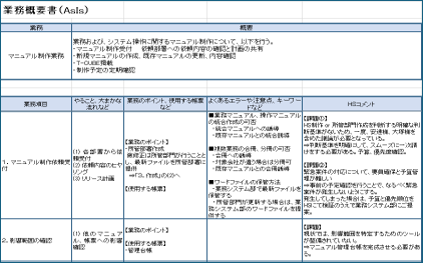
For example, when our company supports the creation of business manuals, we create a "Business Organization Sheet" like the one below to clarify the "5W1H" related to the tasks.
Who (Who): Who performs this task? Who are the person in charge, approver, and verifier?
What (What): What is the subject handled in this task? What are the deliverables, input contents, and items to check?
Why (Why): Why is this task performed? What are the purpose and necessity?
When (When): When is this task performed? What are the timing, triggers, and frequency?
Where (Where): Where is this task performed? What are the location and environment?
How (How): How is this task performed? What are the procedures, tools used, and points to note?
③ Create the manual’s structure and headings (table of contents)
Next, create a "table of contents draft" that decides what to include, in what units and order, and what titles to assign. It is no exaggeration to say that the success or failure of the manual depends on this table of contents. How the table of contents is created can make the information you are looking for either easy or difficult to find.
④ Create the main text of the manual
Once the table of contents is created, proceed to write the main text. Here are three key points to make the manual easy to understand.
1. Utilize images, photos, and videos
A picture is worth a thousand words! Actively use images, tables, and other visuals so that anyone can easily understand.
2. Describe the purpose and reason for the task
The purpose of the task may be obvious to experienced workers, but it is different for beginners. Also, writing the reason for "why this task is performed" deepens the understanding of the work content.
3. Make Searching Easier
Include keywords in headings and the main text so that even those seeing the manual for the first time can quickly find the information they need. By adding keywords, you can improve the ease of finding information.
After considering the above points and completing a draft of the manual, read through the manual from beginning to end to check it. You may also try performing the actual tasks while reading the manual.
When creating a manual, you may be so focused on writing the explanations that you overlook unexpected points. Step back from the creator’s perspective and check whether the procedure explanations are complete, free of errors, and do not contain any expressions that could cause misunderstandings, in order to improve the manual’s quality.
⑤ Distribute and Update the Manual
Distribute the completed manual to the field.
The value of a manual lies in its information being up-to-date and reliable. When feedback from the field or changes in work content occur, establish rules to enable smooth updates of the manual (details will be explained in the next Chapter 2).
Related Blog Posts
6 Key Points for Creating Business ManualsLearn from Other Companies' Examples
How to Create Manuals
We are introducing case studies of companies that have worked on manual creation. Please make use of them.

2. Key Points for Creating a Manual Without Failure!

This chapter introduces six common mistakes in manual creation and points to prevent them.
Mistake ①: Hard to see and hard to read
Manuals with many typos, inconsistent layouts, and densely packed text that is difficult to read lose credibility and are not read.
[Countermeasure] A "Clear and Easy-to-Read" Manual That Reduces Cognitive Load
Create a state where the reader can intuitively understand the content and not get confused (i.e., low cognitive load). Specifically, keep the following three points in mind.
1. Utilize Templates to Establish Consistency
When layout rules such as "title here, image on the left, explanation on the right" are unified throughout all pages, readers can instantly find the information they need.
2. Use one idea per sentence
Instead of explaining with long sentences, break down the instructions into short action units like "① Open XX" and "② Enter YY" to prevent skipping or missing steps during the task.
3. Eliminate Inconsistent Terminology
Using different words for the same action, such as "click" and "press," can cause unnecessary confusion for the reader.
Professional Practical Know-How
When our company creates manuals, we establish the following rules to ensure readability.
・Styling of Warnings and Notes: By setting display styles for warnings and notes, the manual becomes easier to read and less likely to be overlooked by the reader.
・Creation of a glossary: Internal terms and system-specific abbreviations are compiled as "Definitions of Terms" at the beginning or end of the manual so that even new employees will not be confused.
The accumulation of such detailed rules produces high-quality manuals that "anyone can understand in the same way."
Example of Failure ②: It is unclear where anything is written
The second example of failure is a manual where it is unclear where anything is written. A manual serves the role of providing solutions when problems arise. However, what happens if it is difficult to find solutions when you are in trouble? The manual will no longer be relied upon, and people will not feel the need for the manual.
[Countermeasure] Create an easy-to-understand table of contents and headings
When searching for the desired page, many people look for their target page in the table of contents. Therefore, it is important to pay attention to how the table of contents and headings are structured. Consider creating a table of contents by purpose, a table of contents by function, and placing items that users may refer to when in trouble, keeping in mind what users are looking for when creating the table of contents and headings.
Example of Failure ③: Business manuals are scattered within the company
The third example of failure is that business manuals are scattered. When multiple manuals are located here and there, it is unclear which manual should be referenced. Additionally, there is the disadvantage of taking time to search for information.
If the management and operational system is not properly established, manuals will become scattered within the company, causing updates to be overlooked.
[Countermeasure] Standardize management and operational methods
Appoint a manager and unify the management and operational methods within the company. If management and operations span multiple departments or teams, establish rules and guidelines.
Example of Failure ④: Manuals are not updated
The fourth example of failure is that the manual content is not updated and is left with outdated information. Even though there have been changes in work procedures or the introduction of new systems, if the manual remains unupdated, a gap will arise between the actual work content and the manual. As a result, mistakes may occur when following the manual, or extra effort will be needed to ask others for the correct method. When this happens, trust in the manual on the front lines is lost, and gradually, no one will use it anymore.
[Countermeasure] Establish rules and operational methods for updates
The fundamental reason why manuals become outdated is that the update rules and operational methods are not established. First, let's set basic rules such as determining the timing for updates, the person responsible for updates, and the person responsible for checking the update content. Having a designated person to decide whether the manual needs to be updated in the event of changes in operations will lead to smoother operations.
Example of Failure ⑤: Manual creation stalls due to insufficient resources
The fifth example of failure is a lack of resources. Business manuals require more personnel than one might expect. There are many cases where the creation of manuals comes to a standstill due to personnel changes and busy work situations.
[Countermeasure] Work on creation as a team or outsource
A key point to avoid failure is to work on manual creation as a team. If only one or two people work on it, the burden will be too great and progress will be slow. However, working as a team greatly improves the efficiency of manual creation. Also, having many people review it brings the manual closer to a refined state.
Another key point is outsourcing. If manual creation stalls due to a lack of resources, consider outsourcing as an option.
Example of Failure ⑥: Manual Creation is Delayed
The last example of failure is when the creation of manuals is postponed, resulting in taking longer to complete than expected. This could lead to a situation where the release does not make it in time when the manuals are truly needed.
[Countermeasure] Decide on a schedule to complete the manual in advance
Before starting creation, set a schedule for completion. It is important to decide the desired release timing for the manual and then work backward to establish the overall schedule.
For example, if the manual is for new employees, it needs to be completed by April when the new employees join, so aim for completion around mid-March.
Consider how much time each of the following steps for creating the manual will require and when you need to start manual creation accordingly.
・Scope of the manual (What and how much to teach new employees)
・Format of the manual (file format, design, etc.)
・Content to be included and the order of inclusion (Based on the scope of the manual, what kind of table of contents to create and what content to include)
・Collection of materials to be used
・Content creation
・Review and feedback from stakeholders (It is also necessary to consider who will review it), incorporating feedback and finalizing
In addition to the time required for creation, let's establish a reasonable schedule that takes into account busy periods and strive to proceed according to the schedule. By incorporating busy periods into the schedule in advance, it becomes easier to secure time for manual creation.
Learn from Other Companies' Examples
How to Create Manuals
We are introducing case studies of companies that have worked on manual creation. Please make use of them.
3. To Make a Manual That Is Utilized! Key Points for Manual Management

Once the manual is completed, it is not the end. It only becomes effective when it is widely used. Therefore, in this chapter, we will also introduce key points for creating manual operation rules.
Point 1: Help stakeholders understand the importance of the manual
Let stakeholders understand that manuals are important for standardizing and streamlining operations. If the manual is used within a department, explain the purpose and benefits of the manual during meetings.
It is also necessary for the manual creators themselves to fully recognize its importance.
At one company, the issue of work being dependent on specific individuals was a problem. The person in charge, who was instructed by the company to compile their own tasks into a manual, realized that identifying all tasks in detail and organizing the information in an easy-to-understand way for other employees also led to reviewing and improving work procedures. As a result, they gained a sense that the manual was useful for operations and were able to promote the created manual effectively.
Point 2: Store in an easily understandable location
Even if you create a manual with comprehensive content, it will not be read if people do not know where it is stored.
Store it in a shared folder used by the department or team with an easy-to-understand name, and when informing others about the manual, be sure to also let them know where it is stored.
Point 3: Regularly update and improve
Since work content and procedures change daily, regularly review the manual's content and update it with the latest information.
To capture requests from the field, it is effective not only to wait for verbal reports but also to embed a "feedback mechanism" within the manual.
💡Professional Practical Know-How
・Include a link to a dedicated application form (such as a Google Form) for "Reporting errors or improvement requests in the content"
・Regularly conduct surveys for manual users
By establishing such systems, users are more likely to develop a sense of participation, feeling that "we are nurturing the manual ourselves," creating a cycle where the manual becomes firmly established in the workplace.
5 Key Points for a Good Manual
"Good Manuals" are created by
introducing 5 key points clearly using the
'Sa Shi Su Se So' method.
4. (Reference) What Is a Manual in the First Place? Why Create One?

Finally, we will explain what a manual is and why it is created.
What exactly is a manual?
When translated into Japanese, a manual is expressed as "tebiki" (guide), "toriatsukai setsumeisho" (instruction manual), or "tejunsho" (procedure document). A manual is a document that summarizes how to carry out tasks or work, procedures, and points of caution. It is also used to compile knowledge and know-how within an organization into a manual for information sharing among employees.
When explaining how to proceed with tasks, they are often called "work procedure manuals" or "work guides," and when explaining how to use systems or software, they are often called "instruction manuals" or "operation manuals."
What is the difference between a manual and a procedure document?
A manual is a document that comprehensively explains content related to tasks and operations. It describes not only procedures and methods of operation but also provides an overview of the work, precautions, and troubleshooting as needed. On the other hand, a procedure document is a document that explains specific and detailed content about particular tasks or operations. While a manual is intended to promote an overall understanding including the overview and background, a procedure document explains the steps to perform the actual tasks or operations accurately and efficiently.
Procedural documents are often provided as part of a manual.
What is the purpose of a manual?
The purpose of manuals within a company is to standardize operations, that is, to raise the quality of work to a certain level and maintain that state. Let's look at the specific objectives of manuals.
① Standardization of Operations
In addition to standardizing operations, manuals have various benefits.
② Reduction of Training Costs
Having a manual that explains the operations can reduce training costs. For example, it requires a great deal of effort to teach new employees the job verbally from scratch. By having them read the manual in advance, it eliminates the need to teach everything from start to finish.
③ Prevention of Work Personalization
The manual plays a role in preventing the personalization of work by helping many people understand the procedures and points of caution in the business. Jobs that can only be performed by specific individuals pose a risk to companies from the perspective of business continuity. To mitigate such risks, it is important to standardize operations through manuals.
④ Understanding the Overall Picture of Operations
By reviewing the manual, you can grasp the overall picture of the operations. Even new employees who lack proficiency can understand the work to some extent by reading the manual. Additionally, compiling the entire operation into a manual provides an opportunity to review the work content. By systematizing the overall workflow and sharing it with stakeholders, each role becomes visible. As a result, it becomes possible to identify areas where the workload is concentrated in a single flow or where there are unnecessary flows, leading to improved operational efficiency.
Related Blog Posts
What are the management methods to effectively operate manuals?5. Summary
How was it?
This time, we focused on how to create manuals without failure. We introduced some examples of manual failures, but the countermeasures are actually very simple methods.
It is undoubtedly true that manuals are becoming increasingly important in today's society, where work style reforms and remote work are advancing.
That said, many people understand the importance but feel that creating manuals is difficult.
Especially, creating manuals alongside regular work is tough. That’s why outsourcing manual creation is recommended. We particularly recommend entrusting it to professionals who specialize in manual creation.
Among the many manual creation companies, the most recommended is "Human Science." Human Science is a professional in creating business manuals, with a track record of 215 companies and 2,854 manuals created. Here are three reasons why we recommend Human Science.
Reason ①: Manual Creation by Expert Consultants
Expert consultants handle everything from investigating the subject of the manual creation to the actual manual creation.
Even if there are no materials available for the subject, they will manage the process from hearing to manual creation.
Additionally, expert consultants also work on manual improvements, pursuing the ideal form of manuals.
Reason ②: Not only manual creation but also support for establishment
Human Science also handles the important phase after manual creation called “establishment.” By implementing various measures such as supporting regular updates of manuals and conducting manual creation seminars, they approach ensuring that manuals become firmly established in the workplace.
Reason ③: Creation of Video Content
Human Science handles everything from planning video content to shooting and content production. In today's world, where videos are highly compatible with platforms like YouTube, manuals that are "viewed" as well as "read" are effective.


























 Business Manual
 Operation Manual
 Manual creation
 Web Manual
 Director, Writer
 In-house Support
 Video
Video Manual
 Manual Creation
 One-Stop Service for Manual Creation
 Manuals and Documents
 Document Solutions for IT Companies
 Improving Manual UX through UX Writing
 Knowledge Management
 Jamstack
 GitHub/Markdown
 Return to the top of the page

 +81 35-321-3111[Tokyo Headquarters]
  Contact Us
 Resources
