


AI chat services such as ChatGPT, Microsoft Copilot, Google Gemini, and Claude have gained a lot of attention. This blog article explains how to protect confidential information when using these services for business. Take note that you must take precautions against information leaks, even when using AI chat services for translation purposes.
- Table of Contents
-
- 1. What Are AI Chat Services?
- 2. What are ChatGPT, Microsoft Copilot, Google Gemini, and Claude?
- 2-1. ChatGPT
- 2-2. Microsoft Copilot
- 2-3. Google Gemini
- 2-4. Claude
- 3. Secondary Use by AI Chat Services
- 3-1. ChatGPT
- 3-2. Microsoft Copilot
- 3-3. Google Gemini
- 3-4. Claude
- 4. The Hidden Risk of Information Leaks When Using AI Translation
- 5. Summary
1. What Are AI Chat Services?
AI chat services, also known as generative AI or AI text generators, are powered by large language models (LLMs). LLMs are primarily trained on vast amounts of text data available on the internet, enabling them to generate natural sentences that resemble human writing. Depending on the instructions provided (called prompts), LLMs can engage in human-like conversations, write emails and blogs, generate scenarios and ideas, summarize long text, and even translate.
2. What Are ChatGPT, Microsoft Copilot, Google Gemini, and Claude?
2-1. ChatGPT
ChatGPT is an AI chat service developed by OpenAI. It can be accessed and used via a web browser at https://chat.openai.com/. Official apps for iPhone, iPad, and Android have also been released. ChatGPT's basic features are available for free with some restrictions, and these restrictions are progressively lifted in the paid plans (Plus, Pro, and Team). The details of each plan are as follows.
● Readily available "Free Plan"
The "Free Plan" is ideal for those who want to try ChatGPT for the first time. It offers adequate features for those looking to leverage AI for everyday tasks, including access to the latest model GPT-5, file uploads, and image generation. However, usage frequency and speed restrictions apply to each feature.
● Recommended for personal use "Plus"
The most popular choice for individual users seeking more advanced features is the "Plus Plan," priced at $20 per month. Compared to the free plan, it offers significantly increased access to GPT-5 and a much higher message sending limit, as well as faster image generation and access to the trending video generation AI "Sora." It also includes a project management function and the ability to create custom GPTs, providing strong support for creative tasks and learning. For more details on custom GPTs, check out the blog article below.
"GPT-4 Turbo: Customizable GPTs for ChatGPT Have Arrived"
● Maximum performance "Pro Plan"
The "Pro Plan" is available for professionals and heavy users who want to make the most out of ChatGPT. For $200 per month, message sending, file uploads, and high-speed image generation are all unlimited. It also provides full utilization of Deep Research and memory features that can efficiently process large, complex tasks. Additionally, this plan offers early access to new features, making it ideal for those who want to stay on the cutting-edge of AI technology.
● Faster group work in teams "Team Plan"
The "Team Plan" is designed for use by companies and teams. The fee is $25 per user per month, with an annual contract (available for two or more users). In addition to all the features of the Plus Plan, it comes loaded with additional functions that promote teamwork and are particularly useful in business settings, such as integration with in-house knowledge like Google Drive, advanced security features like SAML SSO, and a recording mode that can record and transcribe meetings. It also allows you configure settings that exclude the team’s data from AI learning, so you can apply it to confidential business operations with peace of mind.
In addition to the above plans, Enterprise, Edu, and API plans are also available.
2-2. Microsoft Copilot
Microsoft Copilot is an AI chat service provided by Microsoft. It can be accessed and used via a web browser at https://copilot.microsoft.com/. Official apps for iPhone, iPad, and Android have also been released. Furthermore, it is integrated into Microsoft 365 products such as the Windows operating system, Microsoft Edge web browser, Outlook, Word, Excel, PowerPoint, and Teams. Copilot is free to use on Windows and Edge, but a paid plan is required for Microsoft 365 products (Microsoft Copilot for Microsoft 365).
2-3. Google Gemini
Google Gemini is an AI chat service provided by Google. It was previously named Bard but was renamed Gemini in February 2024. It can be accessed and used via a web browser at https://gemini.google.com/. An official app for Android has also been released. With paid plans (Google AI Pro and Google AI Ultra), Gemini can be used from Gmail and Google Docs. A service called Gemini for Google Workspace is also offered for Google Workspace users.
2-4. Claude
Claude is an AI chat service provided by Anthropic, a U.S.-based AI startup founded by former members of OpenAI. The company's biggest investors include Amazon and Google. You can access and use Claude via a web browser at https://claude.ai/. With paid plans (Pro, Max, Team, Enterprise, and API), you can use the latest AI model, Claude 4.1 Opus.
3. Secondary Use by AI Chat Services
When introducing AI chat services into business operations, it is important to confirm how the input data will be handled. Many AI chat services, including ChatGPT, are freely available on the internet, but depending on the service, the data entered by users may be used to later train the large language models (LLMs). Additionally, chat interactions may be reviewed by people at the service provider. If the data is used for LLM training, it may reappear when a user outside of the company uses the chat service, potentially leading to information leaks. So what can you do to prevent input data from being used for LLM training? This section explains the secondary use policies of various AI chat services and how to prevent secondary use.
3-1. ChatGPT
The secondary use policy of ChatGPT differs depending on which plan you use.
・ For Free, Plus, and Pro Plans
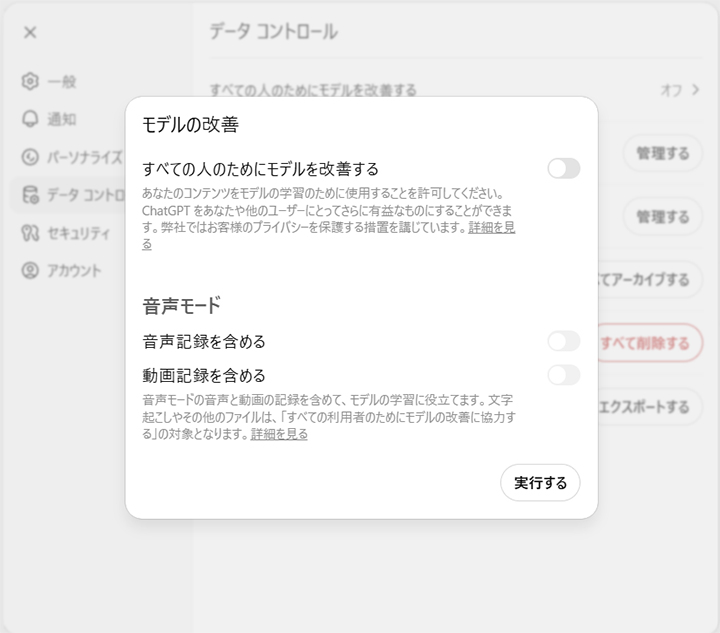
By default, the data you input is used to train and improve the model. To prevent this use of data, access https://chat.openai.com/#settings/DataControls in your web browser and turn off the toggle switch for "Improve the model for everyone."
・ Team Plan
The input data is not used to train and improve the model.
・ API Plan
The input data is not used to train and improve the model. However, input and output data are retained for up to 30 days for the purpose of preventing misuse. Enabling "Zero Data Retention" requires a separate contract but ensures that no data is retained at all.
(Reference: https://help.openai.com/en/articles/7730893-data-controls-faq
and https://openai.com/enterprise-privacy)
3-2. Microsoft Copilot
The secondary use policy for Microsoft Copilot varies by plan. Your input data will only be kept confidential and not used for model improvement if you are subscribed to one of the following plans and are logged in with a work account.
・Enterprise
・Microsoft 365 A1/A3/A5 (including MA3/MA5 for students, MA3/MA5 for educators, and MA3/MA5 student-use benefit)
・Microsoft 365 Business Basic/Business Standard/Business Premium
・Microsoft 365 E3/E5
・Microsoft 365 F1/F3
・Microsoft Teams/Teams Enterprise/Teams Essentials/Teams Rooms
・Office 365 A1/A1 Plus/A3/A5
・Office 365 E1/E1 Plus/E3/E5
・Office 365 F3
(Reference: https://learn.microsoft.com/en-us/copilot/manage)
3-3. Google Gemini
The secondary use policy varies depending on which of Google Gemini's services are used.
・ Free, Google AI Pro, and Google AI Ultra services
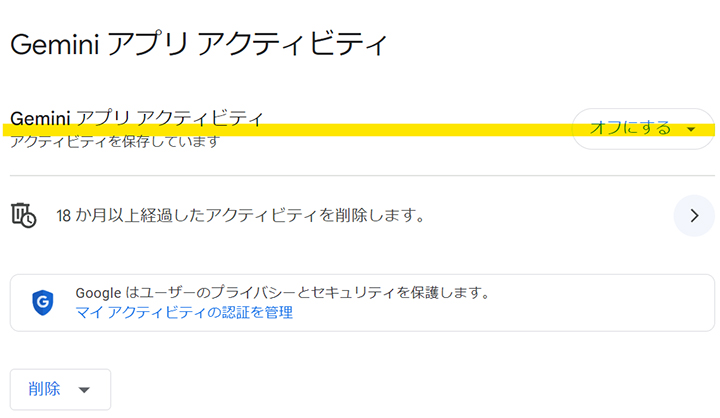
By default, the data you input is used to train and improve the model. Additionally, your interactions with Gemini may undergo human review. To prevent your data from being used for model improvement and human review, visit https://myactivity.google.com/product/gemini and turn off the "Gemini Apps Activity" setting.
(Reference: https://support.google.com/gemini/answer/13594961#your_data)
・ Gemini for Google Workspace
The data you input is not used to train and improve the model.
(Reference: https://support.google.com/a/answer/14130944#zippy=%2Chow-does-gemini-protect-my-data)
・ Gemini API
With a paid plan, the data you input is not used for model improvement. With a free plan it is.
(Reference: https://ai.google.dev/terms)
3-4. Claude
Claude's secondary use policy varies depending on the plan and service used.
・ Free, Pro, and Max Plans
For individual user plans, the data that you input and its output may be reused for service improvement and the development of new services. To prevent these secondary uses, visit https://claude.ai/settings/data-privacy-controls and turn off the "Help Improve Claude" toggle switch.
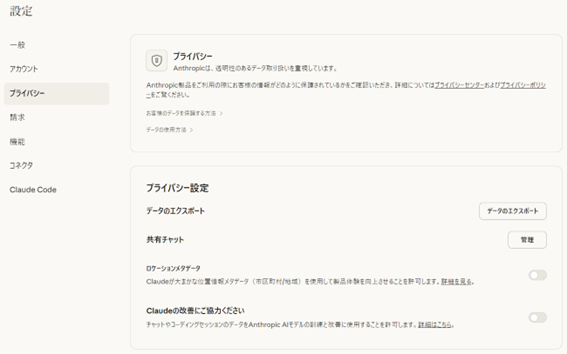
However, even if you turn off this setting, the chat content will be reused if you press the feedback button in the chat.

Also, the chat content will be reused if it is judged to be harmful.
(Reference: https://www.anthropic.com/legal/consumer-terms)
・ Team and Enterprise Plans
The data you input is not used for model training.
(Reference: https://www.anthropic.com/legal/commercial-terms)
・ API Service
The data you input is not used for model training.
(Reference: https://www.anthropic.com/legal/commercial-terms)
4. The Hidden Risk of Information Leaks When Using AI Translation
AI chat services and online translation tools are extremely convenient, but when used for business purposes, there is a risk of information leaks. Using the free services, especially, requires an elevated sense of caution.
To be more specific, there is a possibility that if you copy and paste confidential information for the purpose of translation, such as proper nouns that are only known in-house, that information may appear as translation results for other users. Additionally, there are risks that data stored in the cloud may inadvertantly become searchable on the internet or that if the input text included any URLs, the sites could be snooped on by third parties. Using these services to translate content that contains things like emails from overseas branch employees or business partners is considered particularly high risk.
To avoid such situations, it is essential to choose a paid service with guaranteed security when using automatic translation services for business purposes.
5. Summary
ChatGPT, Microsoft Copilot, Google Gemini, and Claude are AI chat services provided by different companies. These services are powered by large language models that can generate natural sentences that resemble human writing. Additionally, because they have the ability to translate with a level of accuracy that is comparable to dedicated translation services, these AI chat services can be used for translation. However, depending on the service plan and settings, the input data may be reused by the service itself to improve the AI, which carries the risk of information leaks. Therefore, when introducing these services into business operations, you must be cautious about how input data is handled.
Human Science offers MTrans for Office, an automatic translation software that utilizes OpenAI. Since it connects via API, you can use OpenAI without worrying about information leaks. What's more, through a contract with OpenAI that enables Zero Data Retention, there is no 30-day data retention period. OpenAI can be used not only as a translation engine, but can also perform tasks such as transcription, rewriting, and proofreading, depending on the prompt. Try out MTrans for Office with our 14-day free trial offer. Please contact us for more information.
Features of MTrans for Office
- ① Unlimited number of file translations and glossary integration for a fixed fee
- ② One-click translation from Office products!
- ③ Secure API connection
・For customers who want further security enhancement, we also offer SSO, IP restrictions, and so on. - ④ Japanese-language support by a Japanese company
・Response to security check sheets
・Payment by bank transfer available
MTrans for Office is an easy-to-use translation software for Office.













 Return to the top of the page


 +81 35-321-3111[Tokyo Headquarters]
  Contact Us
 Request for Information